
HACK WINDOWS 7 & 8 ADMINISTRATOR PASSWORD

How to HACK WINDOWS 7 and 8 Admin Password.

Hello friends, In this article you will learn how to hack Windows 7 and 8 Admin Password. Here, I have shown to hack Administrator password. Method is same to hack Administrator password of both Windows 7 and 8. I have given screenshots for both. Read all to know.

Requirement:

  1. Self-Responsibility.
  2. Bootable Linux drive (CD, DVD or PD whatever you have.)
  3. Patience.
Learn how to create bootable Linux drive or disk by clicking here.
Now follow these steps to hack Windows 7 and 8 admin password. These steps are same for Windows 7 as well as Windows 8 hacking.
STEP 1: Insert your Disk and switch ON your computer.
STEP 2: As your screen on, just open boot option according to your Motherboard. (Usually F8, F2, or F12 keys are used)
Now your Linux installation screen will appear to select installation type.
STEP 3: Enter on LIVE or Use without Installation.
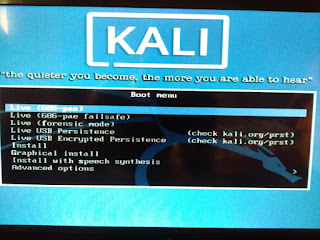
Wait for some minutes to open Desktop.
As desktop comes then from here, follow steps properly.
STEP 4: Go to Places and then click on computer.

STEP 5: From given disks, recognize your windows disk and go to Windows folder.

STEP 6: Go to System32 folder.

STEP 7: Search for utilman.exe and rename it according to your desire.

STEP 8: Now search for cmd.exe

STEP 9: Copy and paste it on same place.

STEP 10: Rename that copy of cmd into utilman.exe (i.e. cmd(copy) to utilman.exe)

STEP 11: Restart your PC and wait for lock screen.
See an option on the bottom at Left Hand Side.

STEP 12: Click on that, you will see the appeared command prompt.

STEP 13: Now type some commands.
>>    net users
>>    net users username
>>    net users username *
Now type the password and retype again. (Don’t think that it is not getting write. Just type and retype) Here replace username to name of user which you want to hack available from options.

STEP 14: Close the command prompt and enter your password in lock screen.
All done……….Congratulation, you have hacked victim’s admin password. If you want to hack victim’s admin password again at next time then there is no need to follow STEPS from STEP 1 to STEP 11. Just follow next steps to hack it again.
Share it with your friends as I am sharing to you. Because Sharing is caring…………..

Comments

Popular posts from this blog

CREATE WHATSAPP GROUP INVITATION LINK

How to create Whatsapp group Invitation link [Now available in Original Whatsapp also] Hello friends, now you can create your own group invitation link in whatsapp to add members themselves. If you want to create a group invitation link then read all. It is very simple method. Below, the page is looking long because I have given in full details with screenshots. Requirements:  You must be  Admin  of that group. Whatsapp Nano .  Click here  to download. Patience. STEP 1: Go to that  group  which you want to create a link. STEP 2: Click to  menu  (i.e. 3 dots). STEP 3. Click on  Group info . STEP 4: Click on  Add participant.. STEP 5:  Here, click on  Invite to group via link .                                                 STEP 6:  Copy  the given link.    ...

HOW TO PROTECT YOUR DATA BY HIDING IT TO ANY VIDEO OR IMAGE?

HIDE your data in IMAGE or VIDEO Hello friends, learn this a new way to hide your data to any image or video. As an example, I am hiding an image to video. You can do reverse also, it means you can hide video in any image. So ready to follow steps. STEP 1: Make your file or video to rar file in which you want hide. Right click on video and click on Add to archieve carehack.rar. You will see your video.rar namein the place of carehack.rar.                                                STEP 2: Open Run by pressing CTRL+R and type cmd there.                       STEP 3: Navigate command prompt(cmd) to your folder. As I am in Desktop so I am navigating it to Desktop.                       STEP 4: Now type command, copy/b nanoware.jpg + care...

9 Steps To Remove Facebook Virus Which Has Infected Over 800,000 Users...

How To Block Or Secure Yourself From This Serious Virus? Follow the below step and you will be sure secure.     Step1.  Open your Facebook account and go to your  settings  using drop-down button right corner of your FB page. Go To Your Facebook Settings Step2.  Go to  Apps Setting . Step3.  Go with the screen click on  Edit screen click on Edit Step4.  Now  Turn Platform Off  by Clicking  Disable Platform . Turn Platform Off by Clicking Disable Platform Now from settings all you have completed but there are some more you need to do. Step5.  Go to your Facebook Inbox ( messages ) and delete all the suspicious spam messages. Step6.  Now Change your  Facebook Password . Step7.  Now it’s time to clean your device using  CCleaner and clean the cache . Step8.  If you are using your computer for Facebook then you must clean your Temporary files, for that from desktop screen pres...